
Recipient Welcome Flyer
Overview
The downloadable Recipient Welcome Flyer helps introduce RedFlag to your recipients and explains how your organization will communicate through the platform.
Two flyer versions are available:
- With Recipient App – Includes information about the RedFlag Alerts app for push notifications and profile updates.
- Without Recipient App – For locations not using the app.
Use the version that fits your setup and customize it before distributing to recipients.
Customizing the Flyer
Add Your Organization’s Logo (Optional)
- Open the flyer PDF.
- Click the top-right corner.
- Upload a
.jpgor.pnglogo file.
Update Delivery Channels
- Under WHAT TO EXPECT, list only the channels your location will use (e.g., text number, voice number, email address).
- Delete any delivery methods you’re not using.
Add Your Location Name (App Flyer Only)
- For the flyer with the RedFlag Alerts app:
- Insert your location name under the DOWNLOAD THE REDFLAG APP section.
- This name can be found in More > Recipient App Settings > Recipient Access in the RedFlag platform.
- Recipients must enter this name to log into the app.
Save the Final Version
- Once all edits are complete, save a non-editable version:
- Go to Menu > Print
- Choose Adobe PDF as the printer to generate a flattened PDF for sharing.
📥 Downloads
Flyer (No Recipient App)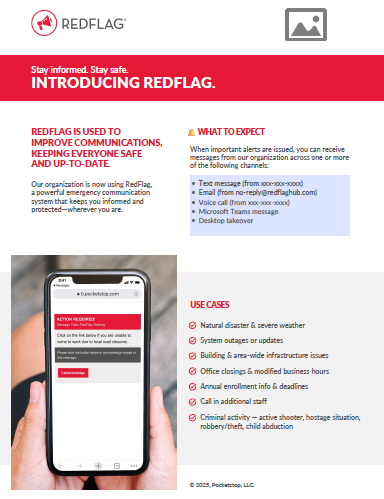 | Flyer (With Recipient App)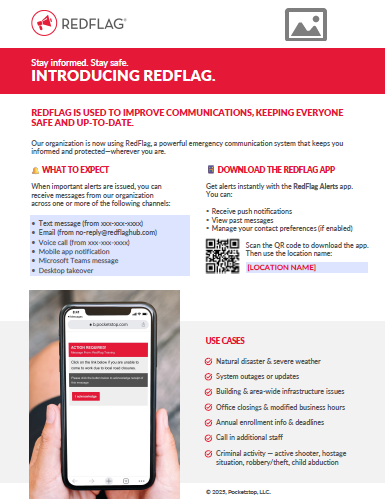 |